Surface-layer draw system
In this super clear sketch, you can see that the layer draw system is based on the window provided by the pygame. The individual surfaces are layered with a priority, while they can have individual sizes.
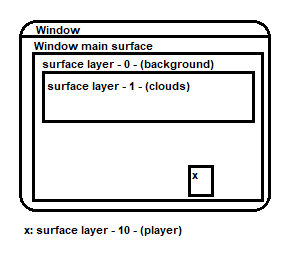
To use the system, you have to create a new layer instance from the core object
self.surface = self.core.create_layer_surface(
                name=None, # used to identify and edit the surface
                width=32,
                height=32,
                x=0, # pos.x
                y=0,  # pos.y
                render_layer: int = 0,
                fill_after_draw=True # auto fill with core.background_color
        )
the surface is now automatically added to the system and displayed at the position (x,y) with (width,height). To display pixels or images on this surface, you can do this in the update method
def update(self):
    ...
    self.surface.blit(img, img_position) # shows the img on the surface,
                                         # if the img has the size 32x32 (same like the surface),
                                         # the img_position should be (0,0) to fill the surface perfect