GameCore

Getting Started

  • Installation
  • External-Tools
  • Basics
  • How to use GameCore

Tutorials

  • Coroutine
  • Drawing System with Animations
  • Navigation
    • Grid-Navigation
    • NavAgent
  • StateMachine
  • Tilemap 2D

Reference

  • Changelog
  • Code-Reference
GameCore
  • Navigation
  • View page source

Navigation

The Navigation section is about moving objects on the screen. It contains one class, NavAgent, and information on how to implement Grid Navigation.

Grid-Navigation

The Grid-Navigation is used for moving on a grid. Ideal for games like chess, checkers, etc. With the built-in function a_star in GameCore, navigation can be implemented in any grid system.

size = (300, 300) # grid size in cells
grid = Grid(size) # a_star.py class

location_a = (20, 2) # grid position, not a pixel position
location_b = (10, 10)

grid.get_node((15, 5)).set_accessibility(False) # set as "wall"
ret = grid.get_path(grid.get_node(location_a), grid.get_node(location_b)) # returns a NodePath object
print(ret.count())
print(ret)
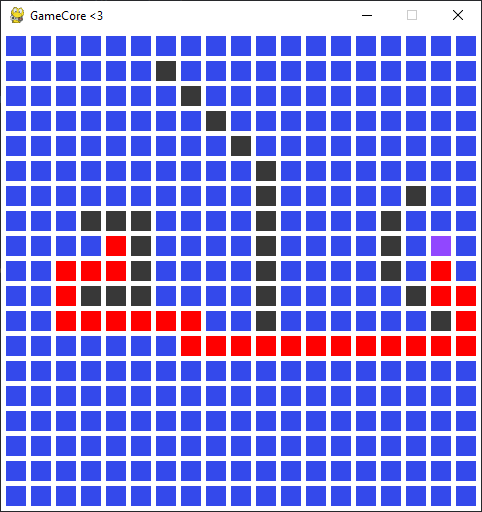
grid navigation

Purple: player | Red: path | Black: wall

  • Example:

    grid_navigation.py

NavAgent

The NavAgent class is used for controlled approximation from one position to another. Ideal for players, enemies and everything that should move.

self.random_destination_position = (random.randint(0, self.core.window_size[0]), random.randint(0, self.core.window_size[1]))
self.agent = NavAgent(
        position=random_position,
        speed=.75
    )
def update(self):
    self.agent.move(destination=self.random_destination_position)
    if self.agent.distance <= 1:
        # destination reached
  • Example:

    SimulationAiUnitPrefab in ai_simulation.py

Previous Next

© Copyright 2024, Niklas Wockenfuß.

Built with Sphinx using a theme provided by Read the Docs.